Note: Consult a doctor for health advice. Check out my favorite health products here: (Amazon Affiliate commission applies)

Top Webcams for Teaching Live Online Yoga Classes
Are your online yoga classes looking grainy? Explore the best webcams for 2026 that will transform your digital studio.Top Webcams for Teaching Live Online Yoga Classes
YOGA GEAR
Rajesh Kumar
3/23/20264 min read
Top Webcams for Teaching Live Online Yoga Classes
My dear friends, welcome back to this space. If you are reading this, you are likely part of that wonderful wave of movement professionals who have embraced the digital mat. Teaching yoga online is a beautiful gift—it allows us to connect with souls across the globe from the comfort of our own sanctuaries. However, we have all been there: you’re guiding a deep, cooling Savasana, but your video is so grainy it looks like a storm of pixels, or you’re demonstrating a complex arm balance and the camera loses focus just as your feet leave the floor.
As a teacher, your presence is your most powerful tool. When that presence is muffled by poor technology, the transmission of the practice suffers. Let's explore this now, and dive into the hardware that will ensure your students see every alignment cue and every peaceful expression with absolute clarity.
Why the Right Webcam Matters for Yoga
Before we look at the specific models, we need to understand the unique challenges of a yoga environment. Unlike a standard office meeting where you sit still, yoga involves:
Constant Movement: You are moving from standing to floor level.
Large Spaces: You need to fit your entire mat (and yourself) in the frame.
Variable Lighting: Many of us teach in sunlit living rooms where shadows change constantly.
As far as reality is concerned, most built-in laptop cameras are simply not up to the task. They lack the field of view to capture a full yoga mat and the processing power to handle movement without blurring. To truly honor the practice and your students’ investment, an external webcam is a must.
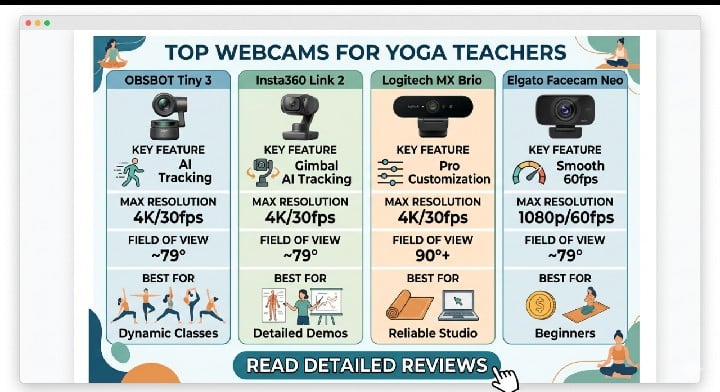
1. The AI Powerhouse: OBSBOT Tiny 3
If you find yourself constantly adjusting your laptop screen because you’ve moved from a standing Warrior II to a seated pigeon pose, this is the solution you’ve been waiting for.
The OBSBOT Tiny 3 is a 4K PTZ (Pan-Tilt-Zoom) camera that uses deep learning to track your movement. In my experience, the AI tracking is spooky-accurate. It doesn't just sit there; it follows you. If you walk to the back of your mat, it pans. If you reach for a prop, it stays with you.
Key Feature: AI Body Tracking and Gesture Control. You can literally put your hand up to tell the camera to zoom in or out without touching your computer.
Resolution: Stunning 4K at 30fps or 1080p at 60fps for buttery smooth movement.
Why it’s great for yoga: It eliminates the need for a camera operator. You are free to move across the entire room, and the camera acts as your personal cinematographer.
2. The Professional Standard: Insta360 Link 2
The Insta360 Link 2 (and its predecessor) changed the game for fitness instructors. Like the Obsbot, it sits on a 3-axis gimbal. However, where it truly shines is in its image processing.
Without taking up any more time, let's proceed to why this might be your top pick. The Link 2 features a massive 1/2" sensor. In the world of cameras, a bigger sensor means better performance in low light and a more "natural" look to the image.
Key Feature: "Whiteboard Mode" and "Overhead Mode." While designed for offices, these are great if you want to show a specific anatomy chart or a top-down view of hand placement.
Autofocus: It uses Phase Detection Auto Focus (PDAF), which is much faster than the standard "hunt and peck" focus found in cheaper webcams.
The Vibe: It looks sleek and professional. If you are building a high-end subscription platform, the image quality here is almost indistinguishable from a DSLR.
3. The Reliable Workhorse: Logitech MX Brio
Logitech has been the king of webcams for decades, and the MX Brio is their latest flagship designed specifically for "pros." It doesn't move or track you like the gimbal cameras above, but it offers some of the best static image quality on the market.
Key Feature: Fine-tuned image customization. Through the Logi Options+ software, you can adjust exposure, color temperature, and brightness to a granular degree.
Wide Field of View: It offers a 90-degree field of view, which is essential for cramped home studios where you need to fit the whole mat in the frame.
Build Quality: It’s built like a tank. If you travel to teach at retreats and need a camera that can survive being tossed in a backpack, this is it.
4. The Budget-Friendly Gem: Elgato Facecam Neo
Not everyone wants to drop $300 on a webcam when they are just starting out. In my experience, the Elgato Facecam Neo is the sweet spot for beginners. It skips the fancy 4K and gimbal motors to focus on what matters: a great 1080p 60fps image.
Key Feature: True 60fps. Most budget cameras claim 1080p but look "choppy" when you move. 60fps ensures that your sun salutations look fluid, not like a slideshow.
HDR Support: It handles "blown-out" windows behind you much better than a standard laptop camera.
Important Considerations for the Yoga Space
Lighting is your best friend.
Even the most expensive 4K camera will struggle in a dark room. Try to have your light source (a window or a ring light) in front of you, not behind you. If the light is behind you, you will appear as a silhouette—great for a mystery, not great for teaching a Downward Dog.
Audio is 50% of the video.
While these webcams have decent microphones, the further you move away from the camera to get your whole body in the frame, the "roomier" and echoey you will sound. As far as reality is concerned, I always recommend pairing a high-quality webcam with a wireless lapel microphone for the best student experience.
Internet Upload Speed.
Streaming in 4K requires a very strong internet connection. If your Wi-Fi is spotty, even a $500 camera will look blurry because the streaming platform (like Zoom or YouTube) will compress your video to keep the call from dropping.
Final Thoughts
Choosing a webcam is an investment in your students' journey. When they can see the subtle micro-adjustments in your feet or the calm focus in your eyes, they feel more connected to the practice.
My dear friends, don't feel like you need the most expensive gear on day one. Start where you are. If you are teaching a restorative class where you stay mostly in one spot, a static camera like the Logitech MX Brio is perfect. If you are a high-energy Power Yoga teacher who likes to move around the room, the OBSBOT Tiny 3 will be your new best friend.
The goal is always to remove the "tech barrier" so that the yoga can shine through.
Contact
rkyogablog@gmail.com